OREM, UT, USA, Jan 19, 2026 – Coreform is excited to announce the latest update 2025.12 to Coreform Cubit, featuring significant enhancements to the Python GUI, improved custom toolbar management, and new specialized toolbars for advanced meshing tasks.
The latest release of Coreform Cubit is now available for download. Existing Coreform Cubit customers can download the latest version from their existing account page. To try Coreform Cubit for your workflow, request a free trial now.
Key Updates:
- PySide6 Now Distributed with Coreform Cubit The Coreform Cubit Python GUI tool has been upgraded to PySide6, the officially supported Python interface to Qt. This transition ensures better long-term compatibility and support. Users with existing custom toolbars written in PyQt5 will need to update them for PySide6 compatibility. In most cases, this involves straightforward changes, such as updating import statements and related references.
- Improved Isolation for Custom Toolbars Custom toolbars are now created in their own dedicated directory space. This change prevents potential overwrites that could occur when multiple toolbars were placed in the same directory. Each toolbar is now automatically placed in a subdirectory based on its name, eliminating name collisions and improving organization.
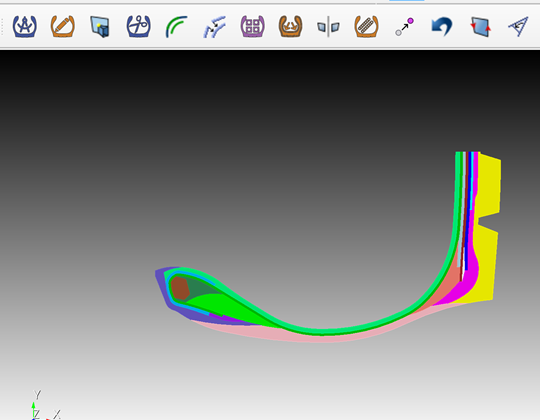
- New 2D Tire Cross-Section Meshing Toolbar Coreform is proud to release a new toolbar specifically designed for 2D tire cross-section meshing. This tool streamlines the process for creating high-quality meshes of tire geometries. The toolbar is available for download on our GitHub page: https://github.com/coreformllc/tire_cross_section_tool.
- Updated DAGMC Toolbar The popular DAGMC toolbar has been refreshed to fully support PySide6, ensuring seamless integration with the Qt6-based GUI. This update makes it compatible with the latest Coreform Cubit features for neutronics simulations. Download the updated toolbar here: https://github.com/coreformllc/cubit-dagmc-toolbar.
- Upcoming Toolbar Webinar Join us on December 12th for an informative webinar on how to leverage these new changes and create your own custom toolbars in Coreform Cubit. This session will provide practical guidance and tips for getting the most out of the updated GUI tools.
Bug Fixes
This release also includes several important fixes to enhance usability:
- Restored the webcut offset option in the non-classic Geometry → Volume → Webcut panel.
- Restored the Group Boolean option in the non-classic Geometry → Group → Boolean panel.
- Corrected a typographic error in the Meshing Power Tool by adding a space between “Merge” and “Tolerance.”
- Updated the GUI to reflect the deprecation of the command import cf_mcnp in favor of import mcnp.
About Coreform LLC
Coreform develops next-generation computer-aided engineering software. Coreform’s founders are authorities in isogeometric analysis and are widely cited researchers. The Coreform IGA solver is based on smooth CAD spline geometry, offering greater accuracy than the faceted meshes used in legacy CAE software. Coreform is also the exclusive commercial distributor of the Cubit meshing software. Coreform was founded in 2014 and is headquartered in Utah, USA. For more information, visit https://coreform.com.