Guest Post by BEACON India – Author: Rutik Bhume, Sr. Application Engineer -PLM
In many engineering projects, a single component may be used across multiple BOM. When that component needs to be replaced due to design updates, supplier changes, or part obsolescence, updating each Bill of Materials (BOM) manually can become a time-consuming task.
SOLIDWORKS Manage provides a Mass Replace capability that allows engineers to replace a BOM item across multiple SBU / BOM through a controlled approval process. This ensures that changes are applied consistently while maintaining full traceability of engineering updates.
Why Mass BOM Replacement is Important
When a component exists in several BOM, replacing it individually in each BOM can be inefficient and prone to errors.
For Example.: (Item P270.51.099.50 has been used in multiple BOM in different SBU)
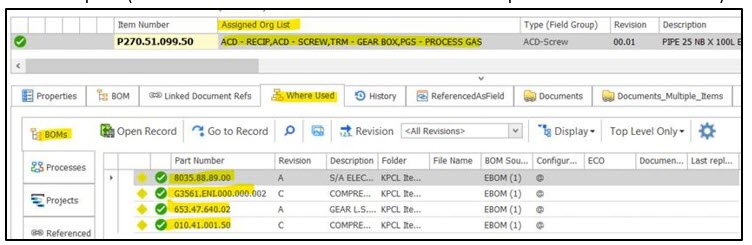
SOLIDWORKS Manage simplifies this process by allowing an item to be replaced across multiple SBU / BOM automatically.
This approach helps engineering teams:
- Reduce manual effort when updating BOM structures
- Maintain consistency across BOM
- Implement engineering changes in a controlled process
- Track and approve changes through a structured Approval/ECO process
How Replace BOM Items Works
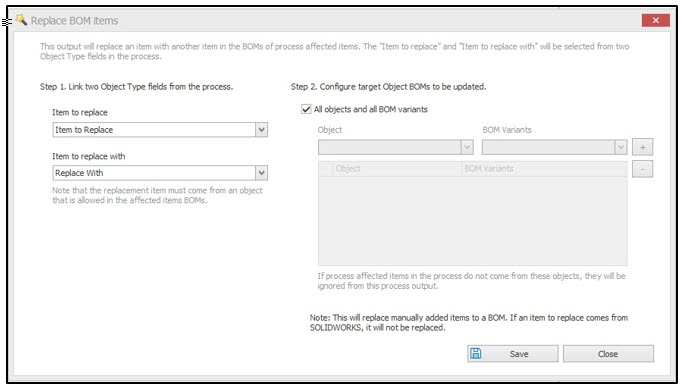
SOLIDWORKS Manage provides a Replace BOM items process output, which allows a BOM record to be replaced with another record across multiple parent BOM.
Using this functionality, engineers can replace a line item that appears in several BOM without editing each BOM individually.
It is important to note that mass replace works only for record objects and not for
SOLIDWORKS CAD references.
Configuring Mass Replace in a Process
To enable BOM replacement, the functionality must first be configured within a process workflow in the System Administration tool.
Options è Administration Option è Process. The configuration requires two object-type fields:
- Source Item Field – holds the item that needs to be replaced (Item to Replace)
- Target Item Field – holds the replacement item (Replace with)
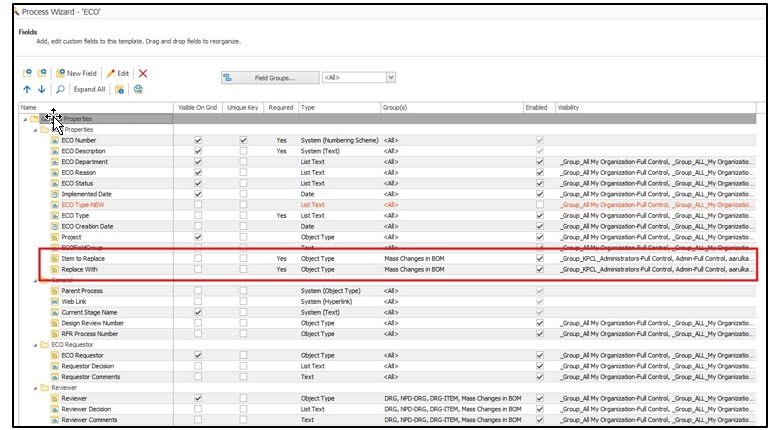
These fields allow the system to identify which item should be replaced and what component should replace it.
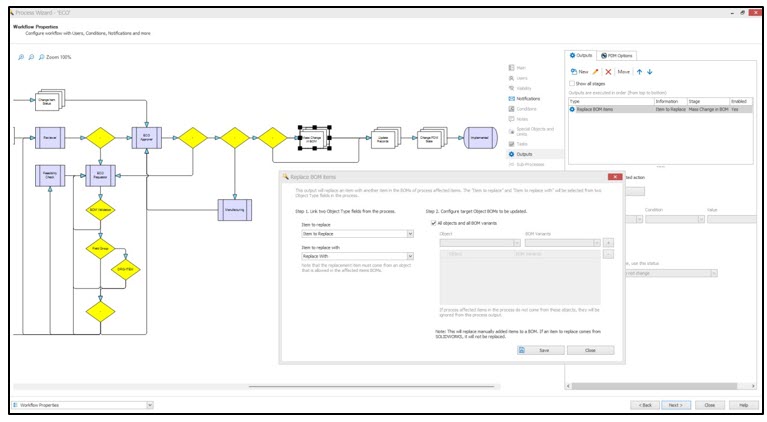
Within the process configuration:
- Navigate to System Administration → Structures → Processes
- Edit the required process
- Create two Object Type fields for the source and target items
- Ensure that Allow Multiple Items is not selected
- Configure user permissions for these fields
- Add Replace BOM items as a process output in the required workflow stage
- Map the source and target item fields in the output configuration
Once this setup is complete, the process will be able to perform BOM replacement during process execution.
Performing BOM Replacement
To replace BOM items in SOLIDWORKS Manage:
- Create a new process record.
- Select the item to replace and the replacement item in the configured fields.
- Navigate to the Affected Items tab.
- Run BOM Replacement Analysis to identify BOM containing the item.
- Select the parent assemblies where the replacement should occur.
- Add the selected BOM to the affected items list.
After the record moves through the approval process stage that contains the Replace BOM items output, the BOMs of the selected BOM are automatically updated.
Users can then open the affected records to verify the updated BOM structures.
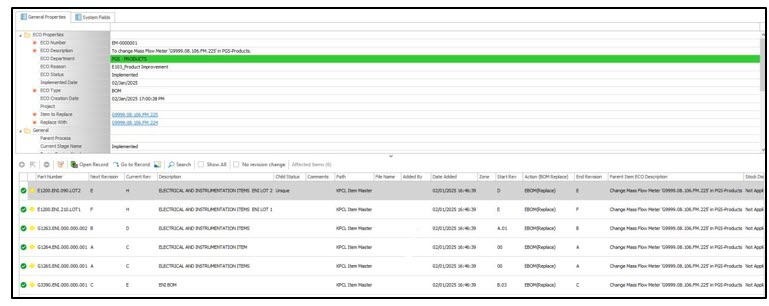
Approval Process for Mass Changes
To ensure proper engineering control, the BOM replacement process is executed through an approval process.
A typical process includes two stages:
Reviewer Stage
The reviewer validates the change and checks the BOM affected by the replacement.
Approver Stage
The approver provides final approval, allowing the system to implement the BOM replacement.
This process ensures that large BOM changes are reviewed before they are applied.
Conclusion
Mass BOM replacement in SOLIDWORKS Manage simplifies the process of updating components used across multiple BOM. By configuring the Replace BOM items output within an approval process, engineering teams can implement large-scale BOM
updates efficiently and with proper change control.
This functionality helps organizations maintain accurate product data while reducing the time required to implement engineering changes.
Guest Post by BEACON India – Author: Rutik Bhume, Sr. Application Engineer -PLM