Home Blog Page 741

ZWSOFT Releases ZW3D 2021 Beta

0

GUANGZHOU, China, Jul 20, 2020 – ZWSOFT unveiled ZW3D 2021 Beta for testing. The new version brings extended functions for CAD design and CAM programming as well as better user experience, helping you tackle more complex tasks. 


62c0c5e2ffc43a6f29d73bcf5f8a5d64


Here are the highlights of ZW3D 2021, and a surprise is waiting for you at the end!

Friendlier Interaction

In ZW3D 2021, user experience has been further improved with some small yet considerate new functions. For example, Command Search helps you quickly search commands by keywords, which is useful for unfamiliar functions. And for repetitive work, Script Record can help by recording the commands as a script, which can be set as a map key to quickly conduct the operation by one click next time. Moreover, the Cartesian Coordinate System is now fully supported, including 2D/3D Datum Axis, Datum Plane, and Datum CSYS, helping with sketch design, modeling, PMI dimensions and assembly constraint setting.


Figure 1. Search needed commands by Command Search.pngFigure 1. Search needed commands by Command Search

Figure 2. Datum Axis is supported.png

Figure 2. Datum Axis is supported


Extended CAD Capabilities

Except for friendlier user experience, CAD functions have been extended for higher-quality design. For sketch design, new functions like Offset Constraint to add constraints to offset entities, Equal Curvature Constraint to realize smoother curves and surfaces, Cosmetic Sketch to provide references for modeling process, etc., are ready for you.

As for modeling, G2 Blend is supported to get filets and blend faces of higher precision, especially benefiting streamlined design. The new Cross Trim function can trim multiple surfaces and sew them at a time.

Assembly has also been remarkably improved with new functions like Include Unplaced Component to insert virtual components in the assembly tree and the 3D BOM, Clearance Check to detect the minimum distance between components, and Batch Attribute Edit to apply attributes to multiple objects simultaneously.


Figure 3. Streamlined design of higher precision by Equal Curvature Constraint.pngFigure 3. Streamlined design of higher precision by Equal Curvature Constraint


Figure 4. The G2 Blend option is supported to get a higher-quality fillet or blend face.pngFigure 4. The G2 Blend option is supported to get a higher-quality fillet or blend face 


Optimized CAM Programming

Enhancements in CAM module are also worth expecting. For instance, more types of cutting tools are supported in turning, including the pentagon, hexagon and octagon ones. What’s more, Full Machine Simulation has been upgraded with Machine Builder, CNC Controller, Machine Register, new measuring tools, etc. It helps you simulate the actual machining process more easily and accurately. Besides, the CAM operation list now can be exported to Excel, where you can also show or hide a specific coordinate. Finally, Arc Fitting is supported in 2X Milling, 5X Milling, and Surface Engraving to help generate higher-quality toolpaths.


Figure 5. The newly-supported cutting tools for turning.pngFigure 5. The newly-supported cutting tools for turning


Figure 6. The upgraded Full Machine Simulation.pngFigure 6. The upgraded Full Machine Simulation


To summarize, ZW3D 2021 brings a lot of new functions and optimizations for better user experience and stronger CAD/CAM capabilities. Now the beta package with a 30-day free trial is available. Welcome to try and share your comments with us in the ZW3D user group. Your voices are valuable to help us deliver a better ZW3D.

One surprise:

From July 15th, 2020 to the official launch of ZW3D 2021, if you buy or upgrade to ZW3D 2020, you can get a free upgrade to ZW3D 2021. Click to join!


85822011fc3803ff4d8238acf082cde3


About ZWSOFT

ZWSOFT CO., LTD. (Guangzhou) is a reliable and innovative engineering software provider with its flagship products ZWCAD and ZW3D. Committed to providing complete and seamless user experience to worldwide users with its all-in-one CAx solutions, ZWSOFT has continuously satisfied diverse needs of various industries such as AEC and MFG. With over 20 years’ experience in the industry, its products and service have been proven by over 900,000 clients across 90 countries. For more information, visit https://www.zwsoft.com.
Invitation
Siemens sd17

MathWorks, NVIDIA DLI Join to Offer ‘Deep Learning with MATLAB’ Course

0

NATICK, MA, USA, Jul 20, 2020 – MathWorks announced that a comprehensive “Deep Learning with MATLAB” course is now available, developed in collaboration with NVIDIA’s Deep Learning Institute. The two-day course is being offered in both instructor-led online and self-paced on-demand formats throughout the rest of 2020. On completion, engineers, scientists, and researchers will be ready to apply GPU-accelerated deep learning techniques in MATLAB to common applications such as image classification, autonomous systems, voice recognition, and object detection. For dates and locations, visit the Deep Learning with MATLAB course schedule.

MathWorks provides a comprehensive platform for building AI-driven systems that is based on decades of supporting complex engineering projects. GPU Coder generates optimized CUDA code from MATLAB code for deep learning, embedded vision, and autonomous systems, which allows developers to build solutions that run efficiently on NVIDIA GPUs. In addition, a MATLAB container from NVIDIA GPU Cloud (NGC), a hub for GPU-optimized AI and HPC software, provides a complete deep learning workflow that uses NVIDIA GPUs to accelerate neural network training to scale up performance across nodes.

“The NVIDIA Deep Learning Institute plays a crucial role in developing hands-on training and showcasing how to use new techniques like deep learning to solve complex problems,” said David Rich, director, MATLAB marketing, MathWorks. “This course offers a practical approach to deep learning that will help NVIDIA users to iterate quickly and converge on a solution that meets product and time-to-market requirements.”

“There’s been a surge of interest in the Deep Learning with MATLAB course using NVIDIA GPUs,” said Will Ramey, senior director and global head of developer programs at NVIDIA. “Learning how to quickly and easily apply the power of NVIDIA GPUs to accelerate neural network training streamlines the process of application development and allows for more rapid deployment and faster time to market.”

About MathWorks

MathWorks is the leading developer of mathematical computing software. MATLAB, the language of engineers and scientists, is a programming environment for algorithm development, data analysis, visualization, and numeric computation. Simulink is a block diagram environment for simulation and Model-Based Design of multidomain and embedded engineering systems. Engineers and scientists worldwide rely on these product families to accelerate the pace of discovery, innovation, and development in automotive, aerospace, electronics, financial services, biotech-pharmaceutical, and other industries. MATLAB and Simulink are also fundamental teaching and research tools in the world’s universities and learning institutions. Founded in 1984, MathWorks employs more than 5000 people in 16 countries, with headquarters in Natick, Massachusetts, USA. For additional information, visit mathworks.com.

Hexagon MI Launches HxGN NC Measure Software Suite

0

SURREY, UK, Jul 20, 2020 – Hexagon’s Manufacturing Intelligence division has launched a new modular software suite, HxGN NC Measure, making it simpler and faster for manufacturers to inspect diverse parts directly on the machine tool.


HxGN-NC-Measure


Designed for ease-of-use, the modular HxGN NC Measure suite allows manufacturers to quickly and accurately undertake either routine or complex inspections directly on the machine tool, with users able to capture, report and use data in the way that best suits their individual needs.

Manuel Müller, Product Marketing Manager at Hexagon, says: “Manufacturers are benefiting from advances in machine tool inspection technology to inspect a growing number of parts directly on the machine tool. Hexagon’s expertise in machine tool inspection and metrology software means we’ve been able to lead the way in simplifying machine tool measurement for our customers, including for complex laser-scanning applications.”

The HxGN NC Measure | Core software package combines a deep understanding of production processes with a highly intuitive interface to make it easy for users to set up and inspect workpieces and create reports that inform rapid decision making.

Additional modules enable operators to perform more tailored or complex inspection tasks and include a ground-breaking module for laser-scanning.

The HxGN NC Measure | laser module makes it possible to accurately capture point clouds for the entire surface of a clamped part, all while benefiting from HxGN NC Measure’s intuitive interface.

Other modules include HxGN NC Measure | Report for saving and exporting data in multiple formats and protocols. HxGN NC Measure | Best-Fit Pro meanwhile saves time by automating part adjustment to ensure the best fit for the part on the machine tool.

HxGN NC Measure is initially available for Siemens, Heidenhain, Fanuc and Röders-controls. Designed to be future-proofed, it enables machine tool companies to keep up-to-date with the latest innovations without having to acquire new software skills.

About Hexagon

Hexagon is a global leader in sensor, software and autonomous solutions. We are putting data to work to boost efficiency, productivity, and quality across industrial, manufacturing, infrastructure, safety, and mobility applications.

Our technologies are shaping urban and production ecosystems to become increasingly connected and autonomous – ensuring a scalable, sustainable future.

Hexagon’s Manufacturing Intelligence division provides solutions that utilise data from design and engineering, production and metrology to make manufacturing smarter.

Hexagon (Nasdaq Stockholm: HEXA B) has approximately 20,000 employees in 50 countries and net sales of approximately 3.9bn EUR. Learn more at hexagon.com and follow us @HexagonAB.

TransMagic R12-SP3 Released for 3D CAD Data Interoperability

0

DENVER, CO, USA, Jul 20, 2020 – TransMagic, a leading provider of software tools for 3D CAD data, announces its latest release: R12-SP3. This release has enhanced capabilities for one-step Technical Data Package creation, complete with 3D views of CAD models and assemblies, CAD data and automatic CAD translation and file attachments.


TransMagic-R12-SP3b


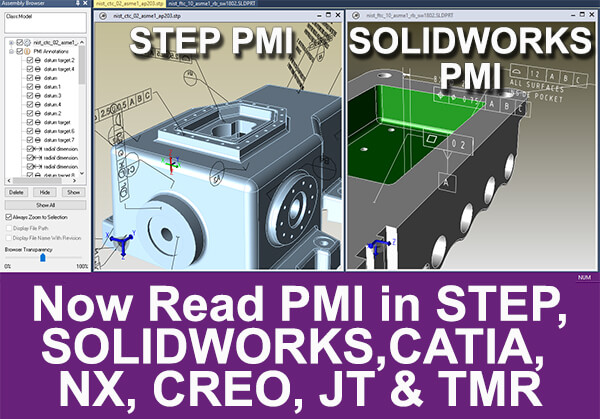
SP3 also equips you with the ability to read SOLIDWORKS and STEP PMI (in addition to CATIA, NX, Creo and JT), and improved performance in other areas.

Technical Data Package (TDP) Enhancements


how-to-create-a-technical-data-package-x600


TransMagic’s TechDocs Technical Data Package combines 3D CAD model views with CAD Data and automatic file attachments.

  1. A manipulatable 3D part or assembly model complete with model tree and assembly hierarchy.
  2. An optional cover sheet with company name, address and logo.
  3. Part information including User Defined Attributes (UDA).
  4. Product and Manufacturing Information (PMI) views and captures, including part sections and semantic PMI in the model tree.
  5. Material properties, mass properties and surface area.
  6. User-defined attachments such as Excel spreadsheets, Word docs and screen captures.
  7. Automatic attachments such as CAD and polygonal formats of your choice. Files are translated and attached automatically as soon as you click ‘OK’.
  8. All TechDocs values for cover page, part information and attachments are saved for easy, one-step automated Technical Data Package creation.

Enhanced PMI Support

Enhanced PMI support for SOLIDWORKS PMI and STEP PMI. Read SOLIDWORKS and STEP PMI and extract that PMI to 3D PDF or complete TechDocs (as mentioned above).


Other native CAD formats TransMagic can read include CATIA, NX and Creo.

All PMI views and captures from the originating document are preserved in the PMI View Browser and accessible for viewing or writing to 3D PDF, TechDocs or TMR (see below).

PMI Font Scaling

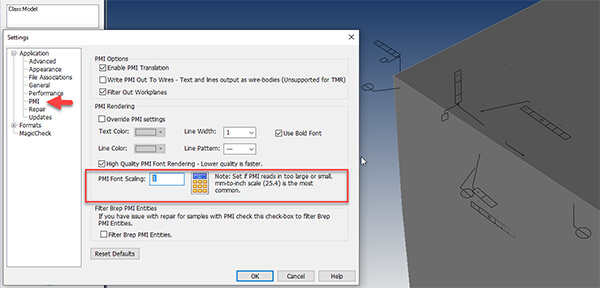
In some older CAD formats, the PMI font will be in mm, while the part is designed in inches. Though the PMI values are correct, they can appear too small as shown in the figure below.


pmi font scaling


PMI Font Scaling, available in Settings > PMI, gives you the ability to scale the size of the PMI back to normal on CAD files affected by this anomaly. Usually the value you want to plug in is 25.4 (instead of the default of 1 – see Figure 3).

Write all PMI values to TMR

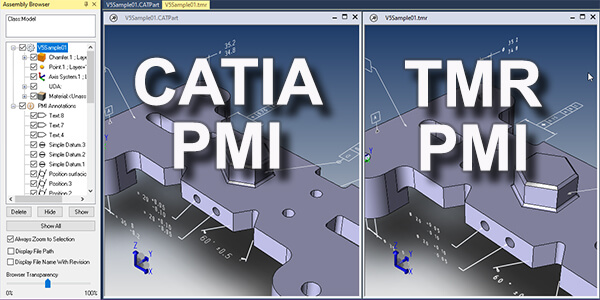
TMR is TransMagic’s native format. You can now write all PMI views and captures to TMR in order to archive models and assemblies, to share model and PMI information with other users who have access to the TMR format, or just to save your work (TransMagic opens TMR files faster than any other format).


write PMI data to TMR


The figure above shows a CATIA file with PMI and, on the right, a TMR file which was derived from the CATIA file.

If you open either of these files with the PMI View Browser, you get the same number and contents of views and PMI captures.

Poly-Line Edges Removed

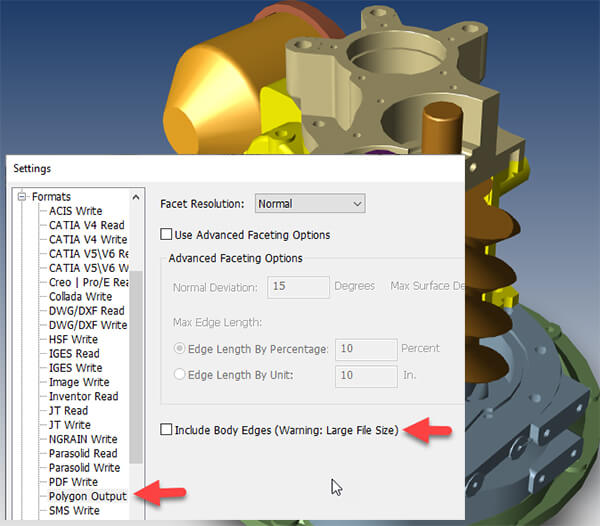
Poly-line edges have been removed for Viz-Rep formats such as Obj. This greatly increases performance and simultaneously improves the look of the geometry.


exclude body edges


Edges can be turned on again by accessing the checkbox as shown in figure above.

About TransMagic

TransMagic develops multi-CAD interoperability software applications that offer a unique combination of 3D CAD file translation, 3D model comparison, geometry repair, collaboration and visualization technologies to alleviate the CAD incompatibility and product data exchange challenges facing the manufacturing industry. With TransMagic, companies can implement seamless workflows for managing 3D CAD data including translation, repair and comparison.

TransMagic serves a broad range of companies; from multi-national aerospace companies to independent machine shops. Anyone who needs to view, collaborate, manage, receive/send or create documentation from 3D CAD models can benefit from using TransMagic tools. For more information, visit https://transmagic.com.

Maxon Announces Agenda for its 3D and Motion Design Show for Siggraph 2020

0

FRIEDRICHSDORF, Germany, Jul 20, 2020 – Maxon, the developers of professional 3D modeling, animation, rendering and motion design software solutions,  announced the speaker lineup and schedule for its upcoming 3D and Motion Design Show for Siggraph 2020. Running from Tuesday, July 21st through Thursday, July 23rd, the free, fully virtual event will be hosted on 3DMotionShow.com (formerly C4DLive.com) and will feature presentations covering VR and AR, character animation, photo real visual effects, motion design and more, presented by the world’s top motion graphics and VFX artists.

Speaker highlights for the 3D and Motion Design Show for Siggraph include:

  1. Creating “Star Wars: The Last Stand” using Cinema 4D with Sekani Solomon. Sekani will demonstrate how he used Cinema 4D to create the dynamic, engaging short film, Star Wars: The Last Stand. In his presentation, he will take viewers through the conceptualization of the project and how he organized shots and created the film’s stunning animation, lighting and effects – all executed mainly by one person.
  2. The Secret to Photo-Real Visual Effects with Clinton Jones, Show Runner at Corridor Digital. Clinton will explain how to integrate photo-real objects into live action footage. Custom HDRIs, camera tracking, scene optimization, texturing, surface imperfections, lighting and compositing tricks in After Effects – Clinton will give the full rundown on how to step up your VFX game!
  3. Using VR and C4D to Make Gestural 3D Assets with Collin Leix, animator at Gunner. In her presentation, Collin will demystify how to use Cinema 4D and VR tools Oculus Medium and Oculus Quill to easily create gestural and organic 3D models. She’ll show viewers how she uses C4D to align her VR work with a style frame, how to refine them with C4D’s sculpting tools and Volume Mesher, how to use Vertex maps and deformers to add subtle animation, as well as experiment in 3D stop motion.
  4. Tips for Character Animation in C4D (and Anywhere Else!) with Alex Parker. Alex will walk through some of her go-to methods for designing and animating compelling characters in Cinema 4D. From quirky character design to technical animation to final compositing, this presentation details a generalist’s approach to crafting characters from start to finish, showcasing C4D toolsets and sprinkling in some generalist advice along the way.
  5. Plus, Maxon, Red Giant and Redshift fan favorites, including Noseman, Rick Barrett, Simon Walker, and Adrian Cruceru, will show off some tips and techniques as well as answer audience questions from the chat.

Visit the 3D and Motion Design Show website to check out the three-day presentation schedule and watch the rewinds from the June 18th show on YouTube for a taste of what to expect.

The 3D and Motion Design Show series of 2020 includes multi-day events designed to coincide with the timing of Siggraph, IBC, NAB Show NY, HOW and Adobe Max. The presentations will showcase professional 3D techniques and real-world production workflows using Cinema 4D, Redshift and the Red Giant suite of products. Presentations from each event will be streamed live and available on demand shortly after airing on 3DMotionShow.com as well as the Maxon YouTube channel.

About Maxon

Maxon is a developer of professional 3D modeling, painting, animation and rendering solutions. In January, Maxon and Red Giant closed a merger of the two companies. The combined company’s award-winning Cinema 4DRedshift 3D and Red Giant products have been used extensively to help create and render everything from stunning visual effects in top feature films, TV shows and commercials, cutting-edge game cinematics for AAA games, as well as for medical illustration, architectural and industrial design applications. Maxon products are available directly from the website and its worldwide distribution network. Maxon is part of the Nemetschek Group.

NX Animation Designer: Enhanced Inverse Kinematics

0

Watch demo on the latest from Animation Designer to the new release of NX.

Video by Siemens Software

Watch more videos on NX on Siemens Youtube Channel 

NX for Manufacturing

0

See what’s new in NX for Manufacturing, comprehensive solution for CAM, CMM and Additive Manufacturing. The latest version features capabilities for faster CNC programming, higher machining efficiency, and streamlined 3D printing job preparation. The enhanced CMM inspection programming tools further automate the creation of inspection paths for improved part quality.

Video by Siemens Software

Watch more videos on NX CAM on Siemens Youtube Channel 

NX License Borrowing for Remote Working

0

Working remotely is going to be the new normal for a while. All customers of NX bundles have the ability to do license borrowing, to work for several months disconnected from the office network.

Video by Siemens Software

Watch more videos on NX – Siemens Youtube Channel 

Ansys Introduces Next-Gen Ansys Discovery, Virtual Launch on Jul 29, 11AM EDT

0

PITTSBURGH, PA, USA, Jul 17, 2020 – Ansys (NASDAQ: ANSS) is helping engineering teams deliver significant gains in productivity, spur innovation and speed time to market with Ansys Discovery. Significantly expanding on the breakthrough advancements delivered by Ansys Discovery Live, this next generation application delivers a comprehensive solution that combines interactive real-time simulation, high-fidelity Ansys solver technology and direct modeling in a single tool — powering cross-team collaboration to cost-effectively develop high-quality products.


structural-analysis-of-advenchair-assembly-within-ansys-discovery-1200Structural analysis of Advenchair assembly within Ansys Discovery. Courtesy of Onward Project LLC.


“Discovery equips our team with a much better understanding of the physics behind our products very early in the design process, enabling them to meet customer requirements more precisely, avoid overengineering and eliminate uncertainties,” said Stefan Macho, head of R&D Simulation, HAWE Hydraulik. “This has resulted in improved product performance, increased design efficiency and shortened product development cycles.”

Discovery is the first simulation tool to combine instant physics simulation, accurate high-fidelity simulation and interactive geometry modeling into a single very easy-to-use interface. Conducting real-time, rapid iterative design explorations, more engineers can now explore larger design spaces and quickly answer critical design questions earlier in the product design process.

“Discovery has made a profound impact on how we engineer new products,” said Mauricio Toro, CEO, TECHFIT Digital Surgery. “By shifting to the left — adopting simulation during the concept and design phases —our team understands the impact of design decisions early, prior to selecting a potentially suboptimal or ultimately more expensive solution.”

Driving widespread adoption of simulation, Ansys Discovery offers an intuitive user experience built for the design engineer, delivers industry-leading fidelity in the analysis stage with embedded Ansys flagship solvers and provides tremendous speed to support design engineering workflows. Teams will be able to innovate more designs in less time, provide rapid design exploration and deliver detailed insight into product performance.

“Discovery delivers a next-generation user experience, enables a very quick and intuitive learning curve for every engineer, and represents as big a step forward in 3D design as the initial release of Ansys Discovery Live. Coupled with our unique real-time simulation technology and gold standard solvers, it has never before been so easy to interactively explore a large design space and perform refinement with peak accuracy,” said Mark Hindsbo, general manager, design business unit, Ansys. “This enables engineers to bring simulation upfront in the ideation and design phase of product development, uncovering risks early before the costs to correct them become high or difficult to change.”


executes-interactive-design-exploration-with-real-time-simulation-of-fluid-flow-behavior-1200Ansys Discovery executes interactive design exploration with real-time simulation of fluid flow behavior within a flow control valve.


Ansys will showcase Discovery’s next generation user experience and real-time simulation capabilities at a virtual launch event on July 29, 2020 at 11 a.m. EDT. Visionary leaders will deliver dynamic insights on the product, perform cutting-edge technology demonstrations, share real-world customer successes and answer questions during interactive breakout sessions. Registration is free but space is limited. To register, please click here.

About Ansys

If you’ve ever seen a rocket launch, flown on an airplane, driven a car, used a computer, touched a mobile device, crossed a bridge or put on wearable technology, chances are you’ve used a product where Ansys software played a critical role in its creation. Ansys is the global leader in engineering simulation. Through our strategy of Pervasive Engineering Simulation, we help the world’s most innovative companies deliver radically better products to their customers. By offering the best and broadest portfolio of engineering simulation software, we help them solve the most complex design challenges and create products limited only by imagination. Founded in 1970, Ansys is headquartered south of Pittsburgh, Pennsylvania, U.S.A. Visit www.ansys.com for more information.

Altair Updates Knowledge Studio a Predictive Analytics, Machine Learning Platform for Data Scientists, Business Analysts

0

TROY, MI, USA, Jul 17, 2020 – Altair (Nasdaq: ALTR), a global technology company providing solutions in product development, high performance computing (HPC), and data analytics, has released a new version of Altair Knowledge Studio that brings even greater speed, flexibility, and transparency to data modeling and predictive analytics.


EdC1n25XgAE6TEd


“As a powerful solution that can be used by data scientists and business analysts alike, Knowledge Studio continues to lead the data science and machine learning market,” said Sam Mahalingam, Altair chief technology officer. “Without requiring a single line of code, Knowledge Studio visualizes data fast, and quickly generates explainable results.”

Accessible to a wide audience of business analysts and data scientists working in areas including fraud prevention, collections optimization, marketing, sales, CRM analytics, product design, and engineering, Knowledge Studio now employs automated machine learning (AutoML) to optimize the modeling process, while offering users unparalleled insight and understanding of how results are achieved.

Optimizing the entire workflow in minutes

Knowledge Studio has earned a best-in-class reputation for advanced functionality, a highly configurable approach to settings, and ease of operation. Available via Altair’s flexible, units-based licensing model, the new version streamlines the entire workflow. At the outset, data is improved automatically by replacing missing values and dealing with outliers. AutoML then builds and compares many different models to identify the best available option. Compared to manual approaches, results are optimized in minutes rather than hours. Greater transparency gives citizen data scientists the opportunity and freedom to learn quickly. Improved control enables data scientists to modify models and fine tune performance.

Lifting the lid on machine learning-powered data modeling

Unlike competitive products, Knowledge Studio does not adopt a ‘black box’ approach that shuts out users. Fully committed to the principles of responsible and explainable artificial intelligence (AI), Knowledge Studio instead lifts the lid on the inner workings of models developed. Although models are developed automatically, explainable AI gives users the confidence that regardless of the model type, the process can be easily understood, interpreted and evaluated.

Other features new to Knowledge Studio include:

  1. Automated Python code generation that supports all predictive modeling – deployment-ready models can be created fast without requiring any coding skill.
  2. Direct data export to Altair Monarch, Altair’s industry-leading data preparation tool.
  3. Support for R code 4.0 and higher.

For more information, visit altair.com/knowledge-studio.

About Altair (Nasdaq: ALTR)

Altair is a global technology company that provides software and cloud solutions in the areas of product development, high performance computing (HPC) and data analytics. Altair enables organizations across broad industry segments to compete more effectively in a connected world while creating a more sustainable future. To learn more, please visit www.altair.com.