Guest Post by: Nishanth, Application Engineer, BEACON India
Introduction
The SOLIDWORKS Application Programming Interface (API) enables developers and engineers to automate tasks, customize workflows, and extend the capabilities of SOLIDWORKS beyond its standard functionality.
Using the SOLIDWORKS API, users can develop macros, custom add-ins, and automation tools that directly interact with SOLIDWORKS parts, assemblies, and drawings.
For organizations that perform repetitive tasks—such as generating drawings, creating models or assemblies, or performing repetitive import/export operations—these processes can be automated using the SOLIDWORKS API. Automation allows companies to significantly reduce manual effort, minimize errors, and improve productivity, often executing complex operations with a single click.
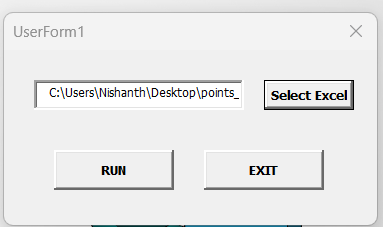
The API also allows developers to build custom user interfaces and buttons making automation tools easy for engineers and designers to use without requiring programming knowledge.
Developers typically interact with the SOLIDWORKS API using programming languages such as:
- VBA (Visual Basic for Applications)
- VB.NET
- C#
These languages allow developers to create scalable automation solutions that integrate seamlessly with the SOLIDWORKS environment.
Types of SOLIDWORKS API Automation
1. Macros
Macros are small automation programs written within the SOLIDWORKS environment and saved in .SWP format.
They are typically used to automate repetitive tasks such as:
- Renaming files
- Applying standard features
- Exporting models to different formats
- Running repetitive modelling operations
Macros can also be assigned to custom toolbar buttons with custom icons, allowing users to execute automation tools directly from the SOLIDWORKS interface.

2. Add-ins
Add-ins are more advanced automation tools developed using environments such as Microsoft Visual Studio.
Unlike macros, add-ins integrate deeply with the SOLIDWORKS interface and can add:
- Custom menus
- Task panes
- Property managers
- Advanced automation workflows
Add-ins are ideal for organizations that require complex automation, system integration, or enterprise-level tools.

Practical Use Cases
1. Design Automation
Companies often automate repetitive modeling tasks such as generating standard parts, configurable components, or product variants.
Example:
A macro or add-in can automatically generate multiple part configurations based on input parameters such as dimensions, material, or design rules.
This reduces manual modeling time and ensures design consistency across projects.
2. Drawing Automation
Engineering drawings can be generated automatically from 3D models using the API.
Typical automated tasks include:
- Inserting standard drawing views
- Applying predefined dimensions
- Generating Bill of Materials (BOM)
- Adding annotations and notes
- Exporting drawings to PDF, DXF, or DWG
This ensures drawings follow company standards and significantly reduces documentation time.
3. Batch File Processing
The SOLIDWORKS API can process large volumes of files automatically, which is extremely useful for companies managing large CAD libraries.
Examples include:
- Converting hundreds of files to STEP, IGES, or Parasolid
- Extracting custom properties from models
- Updating drawing templates
- Renaming or reorganizing file structures
Batch automation eliminates repetitive manual operations and improves workflow efficiency.
4. Integration with Microsoft Office tools
SOLIDWORKS API can also integrate with Microsoft Office tools such as Microsoft Excel to read and with data, while developing models, drawing or assemblies.
This allows companies to automate data flow between engineering and other departments, improving collaboration and data accuracy.
Advantages of Using the SOLIDWORKS API
1. Time Savings
Automation significantly reduces repetitive design and documentation tasks, allowing engineers to complete work faster.
2. Consistency
Automated workflows ensure designs follow company standards, naming conventions, and documentation guidelines.
4. Increased Productivity
Engineers can focus on innovation and design improvements instead of manual repetitive work.
5. Scalability
Automation tools can grow with the organization, supporting everything from simple macros to full enterprise-level solutions.
Conclusion
The SOLIDWORKS API is a powerful extension of the SOLIDWORKS platform that enables automation, customization, and integration.
Whether implemented through simple macros or advanced add-ins, the API allows organizations to streamline workflows, improve efficiency, and unlock new possibilities in CAD automation.
As engineering projects become increasingly complex and data-driven, the role of automation through the SOLIDWORKS API will continue to grow, helping companies improve productivity, maintain design standards, and accelerate product development.
Guest Post by: Nishanth, Application Engineer, BEACON India

We Urge You To Call Us For Any Doubts & Clarifications That You May Have. We Are Eager to Talk To You
Call BEACON India: +91 7406663589
Karnataka & Goa
- Contact Name: Mr. Girish Kumar
- Email: techsupport@beacon-india.com
Chennai
- Contact Name: Mr. Jayakumar B
- Email: jayakumar.b@beacon-india.com
Mumbai
- Contact Name: Mr. Anirudh Ayachit
- Email: support.mumbai@beacon-india.com
Pune
- Contact Name: Mr. Vishal Surwade
- Email: support@beacon-india.com
Gujarat
- Contact Name: Vivek Panicker
- Email: vivekp@beacon-india.com
Hyderabad
- Contact Name: Mr. Agastiya Venkata Ranuva
- Email: agastiya.rv@beacon-india.com
For SOLIDWORKS Product Enquiry Contact:
- Email: info@beacon-india.com