Guest Post by: Pruthviraj Mistry, Customer Success Manager, BEACON India – Best Engineering Aids and Consultancies Pvt. Ltd.
Introduction
In today’s competitive manufacturing environment, a great product deserves a great presentation. Whether you are launching a new product, presenting a concept to a customer, or preparing marketing material, realistic product visualization plays a vital role in making a lasting impression.
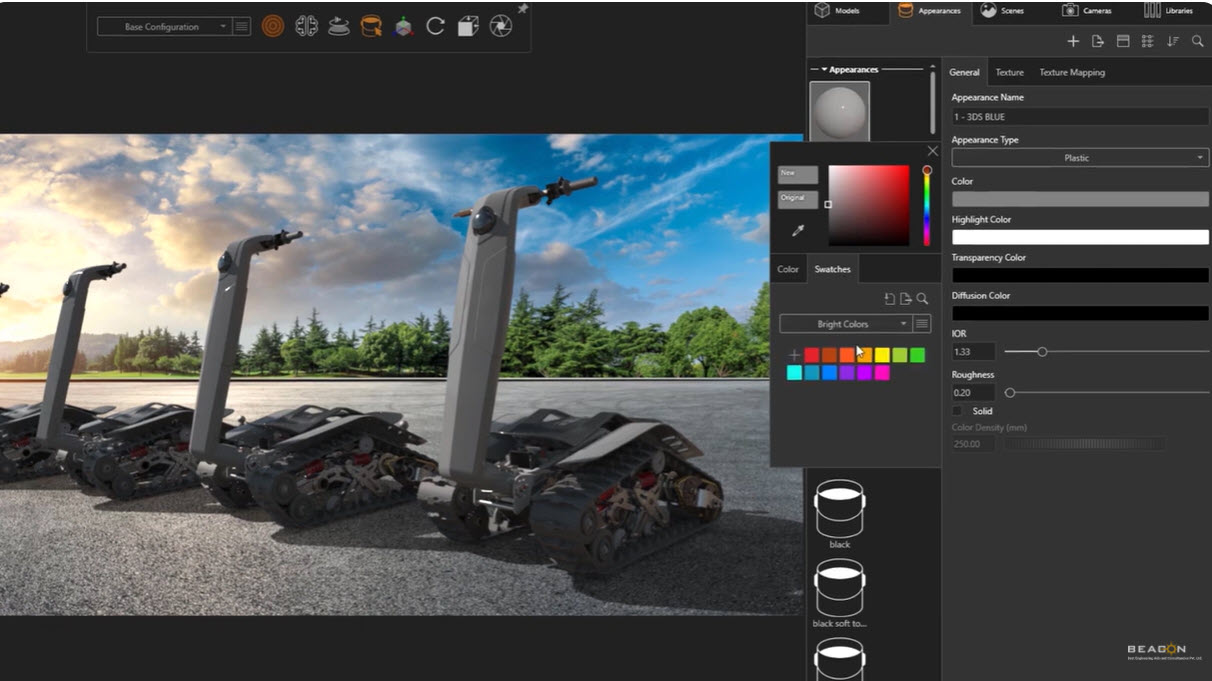
SOLIDWORKS Visualize is a professional rendering solution that converts 3D CAD models into high-quality photorealistic images, animations, and interactive content without requiring a physical prototype. It allows engineers, designers, and marketing professionals to communicate product ideas clearly and effectively.
Why Choose SOLIDWORKS Visualize?
Unlike traditional rendering software that requires extensive graphic design expertise, SOLIDWORKS Visualize offers an intuitive interface that enables users to create professional-quality renders with minimal learning.
Key advantages include:
- Photo-quality rendering directly from CAD models
- No need to build expensive physical prototypes
- Faster product approvals
- Better communication with customers
- Improved product presentations
- Reduced time-to-market
Key Features
- GPU-accelerated rendering
- Physically accurate lighting
- Realistic materials and textures
- HDR environments
- Live CAD model updates
- Multiple output formats
- Easy camera controls
Business Benefits
Manufacturers can showcase products before production begins, helping marketing teams prepare catalogs, brochures, websites, and advertisements well in advance. Engineering teams can also identify design issues earlier by reviewing realistic renderings.
Conclusion
SOLIDWORKS Visualize bridges the gap between engineering and marketing by enabling companies to create stunning product visuals quickly and efficiently. It helps businesses reduce development costs while improving customer engagement.
Watch Webinar on Demand
Whitepaper / Datasheet
https://www.solidworks.com/media/solidworks-visualize-datasheet?utm_source=chatgpt.com
Guest Post by: Pruthviraj Mistry, Customer Success Manager, BEACON India – Best Engineering Aids and Consultancies Pvt. Ltd.