Discover how SWOOD helps woodworking manufacturers design, automate, nest, and manufacture custom wood projects directly within SOLIDWORKS.
Guest Post by Pruthu S Shastry, Application Engineer, BEACON India
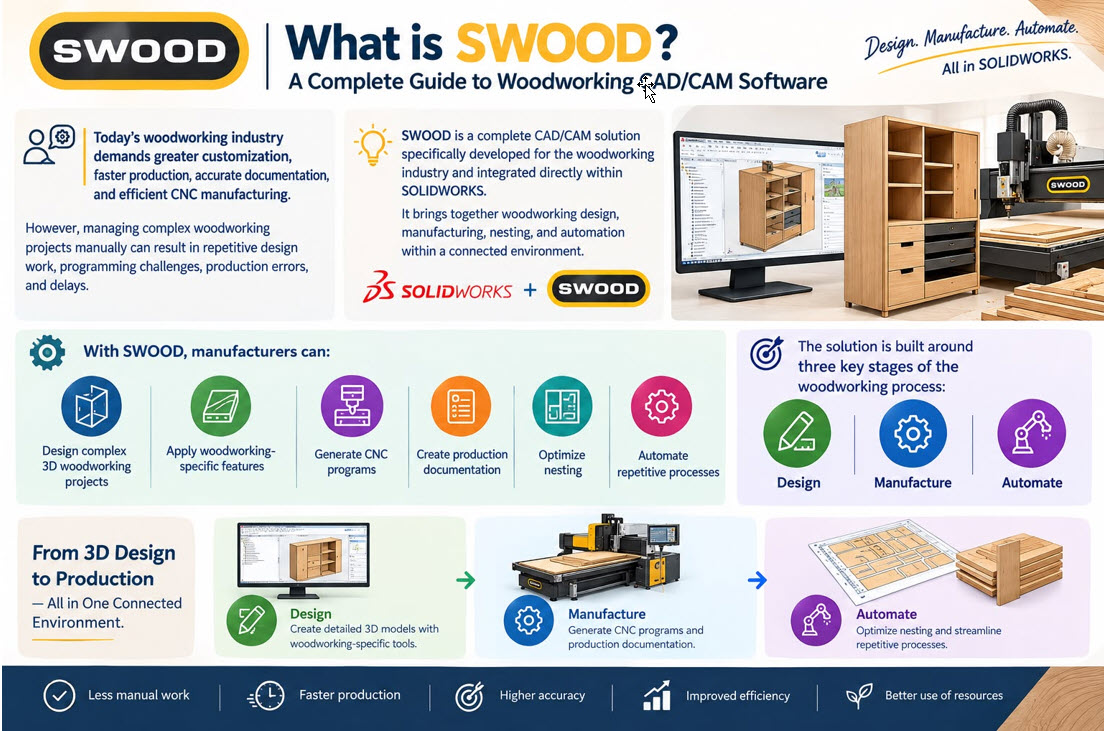
What is SWOOD? A Complete Guide to Woodworking CAD/CAM Software
Today’s woodworking industry demands greater customization, faster production, accurate documentation, and efficient CNC manufacturing. However, managing complex woodworking projects manually can result in repetitive design work, programming challenges, production errors, and delays.
SWOOD is a complete CAD/CAM solution specifically developed for the woodworking industry and integrated directly within SOLIDWORKS. It brings together woodworking design, manufacturing, nesting, and automation within a connected environment.
With SWOOD, manufacturers can design complex 3D woodworking projects, apply woodworking-specific features, generate CNC programs, create production documentation, optimize nesting, and automate repetitive processes.
The solution is built around three key stages of the woodworking process:
- Design
- Manufacture
- Automate
This integrated approach helps maintain information continuity from the initial 3D design through to production.
Why SWOOD is Essential for Modern Woodworking Manufacturing
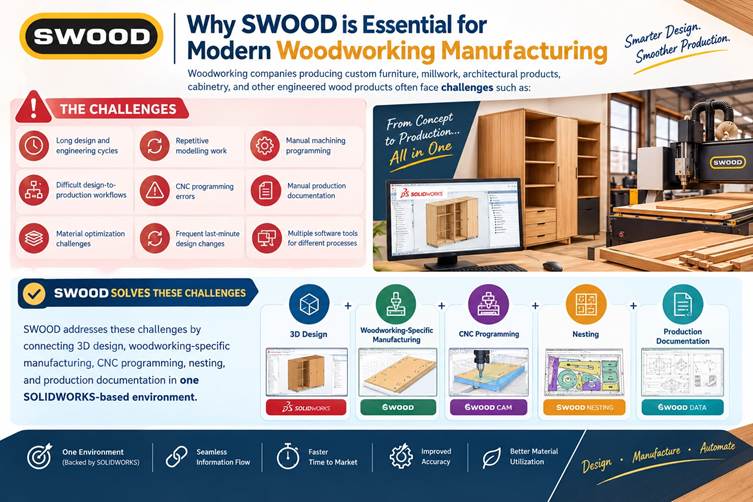
Woodworking companies producing custom furniture, millwork, architectural products, cabinetry, and other engineered wood products often face challenges such as:
- Long design and engineering cycles
- Repetitive modelling work
- Manual machining programming
- Difficult design-to-production workflows
- CNC programming errors
- Manual production documentation
- Material optimization challenges
- Frequent last-minute design changes
- Multiple software tools for different processes
SWOOD addresses these challenges by connecting 3D design, woodworking-specific manufacturing, CNC programming, nesting, and production documentation in one SOLIDWORKS-based environment.
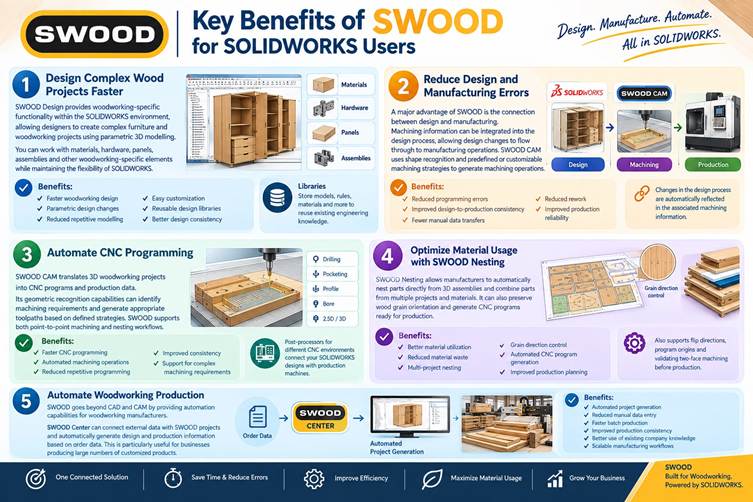
Key Benefits of SWOOD for SOLIDWORKS Users
1. Design Complex Wood Projects Faster
SWOOD Design provides woodworking-specific functionality within the SOLIDWORKS environment, allowing designers to create complex furniture and woodworking projects using parametric 3D modelling.
Users can work with materials, hardware, panels, assemblies, and other woodworking-specific elements while maintaining the flexibility of SOLIDWORKS.
Benefits:
- Faster woodworking design
- Parametric design changes
- Reduced repetitive modelling
- Easy customization
- Reusable design libraries
- Better design consistency
SWOOD also allows companies to store models, rules, materials, and other information in libraries, helping organizations reuse existing engineering knowledge.
2. Reduce Design and Manufacturing Errors
A major advantage of SWOOD is the connection between design and manufacturing.
Machining information can be integrated into the design process, allowing design changes to flow through to manufacturing operations. SWOOD CAM uses shape recognition and predefined or customizable machining strategies to generate machining operations.
Benefits:
- Reduced programming errors
- Improved design-to-production consistency
- Fewer manual data transfers
- Reduced rework
- Improved production reliability
Because design and manufacturing information remain connected, changes made during the design process can be reflected in the associated machining information.
3. Automate CNC Programming
SWOOD CAM translates 3D woodworking projects into CNC programs and production data.
Its geometric recognition capabilities can identify machining requirements and generate appropriate toolpaths based on defined strategies. SWOOD supports both point-to-point machining and nesting workflows.
Benefits:
- Faster CNC programming
- Automated machining operations
- Reduced repetitive programming
- Improved consistency
- Support for complex machining requirements
SWOOD also provides post-processors for different CNC environments, helping manufacturers connect their SOLIDWORKS-based designs with their production machines.
4. Optimize Material Usage with SWOOD Nesting
Material optimization is an important consideration in woodworking manufacturing.
SWOOD Nesting allows manufacturers to automatically nest parts directly from 3D assemblies and combine parts from multiple projects and materials within the nesting process. It can also preserve wood grain orientation and generate CNC programs ready for production.
Benefits:
- Better material utilization
- Reduced material waste
- Multi-project nesting
- Grain direction control
- Automated CNC program generation
- Improved production planning
SWOOD Nesting also provides capabilities for defining flip directions, program origins, and validating two-face machining before production.
5. Automate Woodworking Production
SWOOD goes beyond CAD and CAM by providing automation capabilities for woodworking manufacturers.
SWOOD Center can connect external data with SWOOD projects and automatically generate design and production information based on order data. This is particularly useful for businesses producing large numbers of customized products.
Benefits:
- Automated project generation
- Reduced manual data entry
- Faster batch production
- Improved production consistency
- Better use of existing company knowledge
- Scalable manufacturing workflows
This makes SWOOD particularly valuable for companies handling both customized and high-volume woodworking projects.
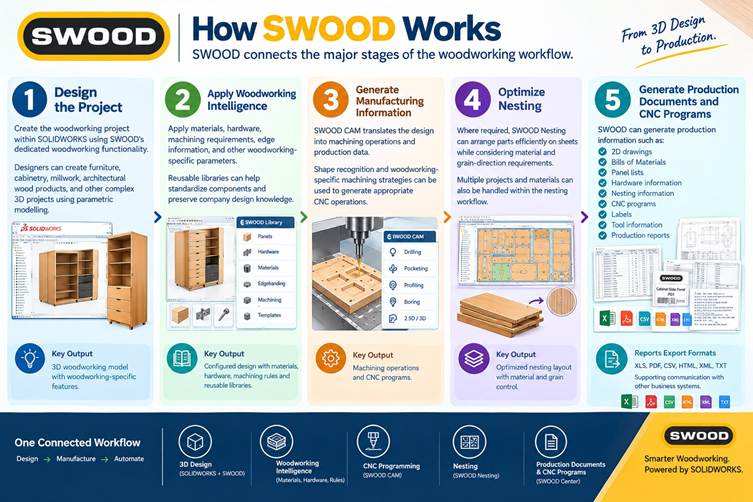
How SWOOD Works
SWOOD connects the major stages of the woodworking workflow.
Step 1: Design the Project
Create the woodworking project within SOLIDWORKS using SWOOD’s dedicated woodworking functionality.
Designers can create furniture, cabinetry, millwork, architectural wood products, and other complex 3D projects using parametric modelling.
Step 2: Apply Woodworking Intelligence
Apply materials, hardware, machining requirements, edge information, and other woodworking-specific parameters.
Reusable libraries can help standardize components and preserve company design knowledge.
Step 3: Generate Manufacturing Information
SWOOD CAM translates the design into machining operations and production data.
Shape recognition and woodworking-specific machining strategies can be used to generate appropriate CNC operations.
Step 4: Optimize Nesting
Where required, SWOOD Nesting can arrange parts efficiently on sheets while considering material and grain-direction requirements.
Multiple projects and materials can also be handled within the nesting workflow.
Step 5: Generate Production Documents and CNC Programs
SWOOD can generate production information such as:
- 2D drawings
- Bills of Materials
- Panel lists
- Hardware information
- Nesting information
- CNC programs
- Labels
- Tool information
- Production reports
SWOOD reports can be exported in formats including XLS, PDF, CSV, HTML, XML, and TXT, supporting communication with other business systems.
Core Features of SWOOD
Woodworking Design
SWOOD Design provides dedicated woodworking functionality inside SOLIDWORKS, including parametric 3D design, material management, hardware libraries, and reusable design information.
SWOOD CAM
SWOOD CAM connects 3D woodworking designs with CNC manufacturing.
It provides geometric recognition, machining strategies, toolpath generation, and post-processing capabilities for CNC production.
SWOOD Nesting
SWOOD Nesting optimizes the arrangement of parts on sheets and supports multi-project and multi-material nesting workflows.
SWOOD Center
SWOOD Center supports advanced automation by connecting external data sources with SWOOD projects and automating the generation of design and production information.
Automated Production Documentation
SWOOD can automatically compile project information into production reports.
These reports can include drawings, bills of materials, material information, edge-banding information, nesting data, CNC machining data, and other production information.
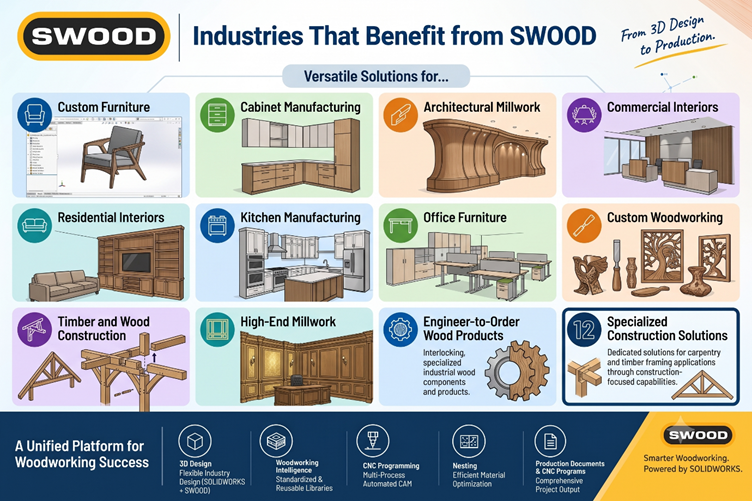
Industries That Benefit from SWOOD
SWOOD is designed specifically for woodworking professionals and can support a wide range of applications, including:
- Custom Furniture Manufacturing
- Cabinet Manufacturing
- Architectural Millwork
- Commercial Interiors
- Residential Interiors
- Kitchen Manufacturing
- Office Furniture
- Custom Woodworking
- Timber and Wood Construction
- High-End Millwork
- Engineer-to-Order Wood Products
SWOOD also provides dedicated solutions for carpentry and timber framing applications through its construction-focused capabilities.
SWOOD vs Traditional Woodworking Design and Manufacturing
| Feature | Traditional Workflow | SWOOD |
| 3D Woodworking Design | Manual | Parametric |
| Wood-Specific Features | Limited/Separate Tools | Integrated |
| Design Changes | Manual Updates | Connected Workflow |
| CNC Programming | Manual | Automated |
| Machining Recognition | Manual | Automated |
| Nesting | Separate Process | Integrated |
| Production Documentation | Manual | Automated |
| Design Reuse | Limited | Library-Based |
| Material Optimization | Manual | Automated Nesting |
| Design-to-Manufacturing Flow | Multiple Steps | Connected |
Why Companies Invest in SWOOD
Woodworking manufacturers adopting SWOOD can benefit from:
- Improved design productivity
- Faster project turnaround
- Reduced repetitive work
- Fewer design and manufacturing errors
- Faster CNC programming
- Better material utilization
- Improved production documentation
- Greater design-to-manufacturing continuity
- Increased reuse of company knowledge
- More scalable production
By connecting design, manufacturing, nesting, and automation, SWOOD helps woodworking companies move from disconnected processes toward a more integrated digital workflow.
Conclusion
As woodworking manufacturers face increasing demands for customization, shorter delivery times, and greater production efficiency, traditional disconnected design and manufacturing workflows can become a significant limitation.
SWOOD for SOLIDWORKS provides an integrated approach to woodworking CAD/CAM by connecting design, manufacturing, nesting, CNC programming, documentation, and automation within a single environment.
Whether your goal is to design custom furniture faster, automate CNC programming, optimize sheet utilization, reduce production errors, or create a scalable manufacturing workflow, SWOOD provides woodworking-specific capabilities while leveraging the SOLIDWORKS environment.
For companies looking to design smarter, manufacture faster, and automate their woodworking processes, SWOOD provides a complete CAD/CAM platform built specifically for the industry.
Guest Post by Pruthu S Shastry, Application Engineer, BEACON India