Guest Post Author: Mr. Jayakumar B , Technical Manager, BEACON India
As of 2026, SOLIDWORKS has undergone a significant technological shift, moving from a traditional CAD tool to a fully integrated, AI-augmented engineering ecosystem. The current 2026 release and the previous 2025 updates focus heavily on automation, cloud-native collaboration, and physically accurate rendering.
Here is the breakdown of the major technology updates:
1. AI-Powered Engineering & Automation
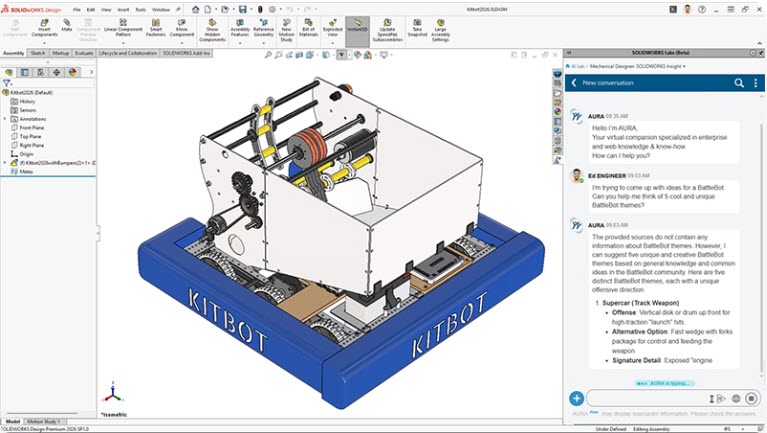
The most notable shift in 2026 is the introduction of AURA, an AI-powered virtual companion integrated directly into the interface.
- AURA Virtual Companion: This AI assistant provides real-time design guidance, retrieves information from community knowledge bases (3DSwym), and helps troubleshoot complex assembly issues.
- Automatic Drawing Generation: Now in Beta for 2026, this tool uses AI to auto-generate 2D drawings from 3D models, significantly reducing the manual effort of detailing and dimensioning.
- Auto-Fastener Recognition: When you insert components into an assembly, the software now automatically recognizes hardware like nuts, bolts, and washers and mates them instantly based on geometry.
2. Next-Gen Rendering: DSPBR
SOLIDWORKS 2026 has introduced DSPBR (Dassault Systèmes Physically Based Rendering), which replaces older material libraries.
- Photorealism: Unlike previous versions, DSPBR models light behavior as it exists in reality. Materials now react to lighting with accurate reflections, shading, and “normal maps” for surface texture without adding geometry.
- One-Click Rendering: You can now render high-quality images directly within the SOLIDWORKS graphics area without needing to export to external software, streamlining marketing and presentation workflows.
3. Cloud Services & “Design Anywhere”
Starting in 2024 and fully maturing in 2026, Cloud Services are now a standard part of the desktop license.
- Unplanned Offline Mode: A major 2026 update allows users to work without an internet connection seamlessly; the system automatically synchronizes all changes to the 3DEXPERIENCE platform once a connection is restored.
- Selective Loading: For massive assemblies, you can now selectively load only the sections you need from the cloud, allowing global teams to work on the same model without hardware lag.
4. Performance & Core Modeling Enhancements
| Feature | 2026 Technological Improvement |
| Assembly Rebuilds | “Smarter Rebuild” skips updates for components that only had cosmetic changes (color/texture). |
| Sketching | New “Shift-Square” shortcut for rectangles and improved repair for dangling relations. |
| Sheet Metal | Enhanced corner treatments and improved flat-pattern accuracy for complex bends. |
| Large Design Review | Now supports interference detection and advanced filtering within the lightweight mode. |
Key Takeaway for Users
The 2026 update signals that SOLIDWORKS is no longer just “desktop software.” It is now a connected platform where your data management, AI-assisted design, and high-end visualization happen in one unified environment.
The SOLIDWORKS 2026 release represents a massive technological shift, moving from a standard 3D modeling tool to an AI-active design partner. The focus has moved toward automation, cloud-integrated data management, and real-time collaboration.
1. The Rise of AI Virtual Companions
The most significant update is the introduction of AURA and LEO, AI-powered companions integrated directly into the workspace.
- AURA (Virtual Assistant): A conversational AI trained on official documentation and community knowledge. It can troubleshoot errors, summarize forum posts, and guide you through complex commands like “How do I create a bidirectional linear pattern?”
- Auto-Generate Drawings (Beta): Using the LEO AI, SOLIDWORKS can now automatically create a complete 2D drawing from a 3D part. It handles sheet formatting, view placement to avoid overlap, and hole callouts, leaving the engineer to simply act as an editor.
2. Assembly & Modeling Automation
New machine learning tools significantly reduce “click fatigue” in large-scale projects:
- Smart Fastener Recognition: The AI now recognizes components that look like fasteners (nuts, bolts, washers) even if they aren’t from the standard Toolbox. It automatically identifies the hole and required orientation for assembly.
- Selective Loading: To handle massive assemblies faster, you can now use component relationship visualization to filter and load only the specific portions of the design you need from the 3DEXPERIENCE platform.
3. Core Workflow Enhancements
| Feature Area | Key Technology Update |
| User Experience | Automatic Unplanned Offline Mode ensures you don’t lose work during connectivity drops. |
| Simulation | 30% faster solve times for Plastics (Fill, Pack, Warp) and new automated thermal gap filling. |
| Sheet Metal | Custom start points for base flanges and automated corner breaking on folded geometry. |
| Cloud Services | Direct USDZ and glTF export for high-fidelity AR/VR rendering and web sharing. |
Comparison: Traditional vs. 2026 Workflow
| Traditional SOLIDWORKS | SOLIDWORKS 2026 | |
| Drawing Creation | Drawing Creation Manual view placement and dimensioning | Drawing Creation AI-automated (LEO) view generation |
| Mating Hardware | Mating Hardware Manual mating of every bolt/washer | Mating Hardware Smart Fastener recognition and auto-assembly |
| Data Access | Data Access Local file management / PDM | Data Access Cloud-native (3DEXPERIENCE) with Selective Loading |
| Troubleshooting | Troubleshooting Manual search of forums/manuals | Troubleshooting Integrated AI companion (AURA) |
Recommendation
If you are working on complex assemblies or spend significant time on repetitive 2D detailing, upgrading to SOLIDWORKS 2026 is highly recommended for the 30% performance boost and AI automation alone.
Guest Post Author: Jayakumar B , Technical Manager, BEACON India
Image courtesy: Dassault Systèmes – SOLIDWORKS