Design Faster. Collaborate Smarter. Innovate with AI.
Guest Post by: Mr. Aakash Sonawane, Pre-Sales Application Engineer, BEACON
Artificial Intelligence is no longer an add-on—it is becoming an integral part of the engineering workflow. SOLIDWORKS Design 2026 introduces a new generation of embedded AI capabilities that reduce repetitive work, automate documentation, accelerate design decisions, and enhance collaboration across the product development lifecycle.
📌 WHAT’S NEW IN SOLIDWORKS 2026?
AI Highlights
🧠 AI-Powered Drawing Creation
🤖 AI Virtual Companion
⚙ Intelligent Assembly Assistance
🔍 Natural Language Knowledge Search
📊 Smart Design Recommendations
☁ Cloud-Based AI Collaboration
📄 Automated Documentation
FEATURE STORY
AI is Transforming Engineering
Today’s engineering teams face increasing product complexity, shorter development cycles, and growing collaboration requirements. SOLIDWORKS 2026 responds by embedding AI directly into the design environment, helping engineers automate repetitive tasks while maintaining complete control over engineering decisions.
Instead of replacing designers, AI serves as an intelligent engineering assistant that learns from design data, accelerates workflows, and improves productivity.
FEATURE 1
AI-Powered Drawing Creation
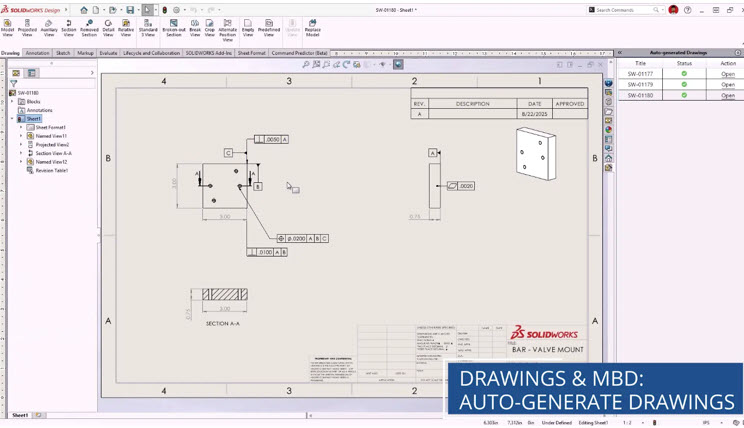
One of the most significant additions in SOLIDWORKS 2026 is AI-assisted drawing generation.
With a single command, AI can automatically create manufacturing drawings by:
✔ Selecting the appropriate drawing template
✔ Generating standard views
✔ Creating section views
✔ Adding dimensions
✔ Identifying hole callouts
✔ Creating Bills of Materials (BOM)
✔ Inserting revision tables
This dramatically reduces the time required to produce production-ready drawings while improving consistency and accuracy.
FEATURE 2
AI Virtual Companion
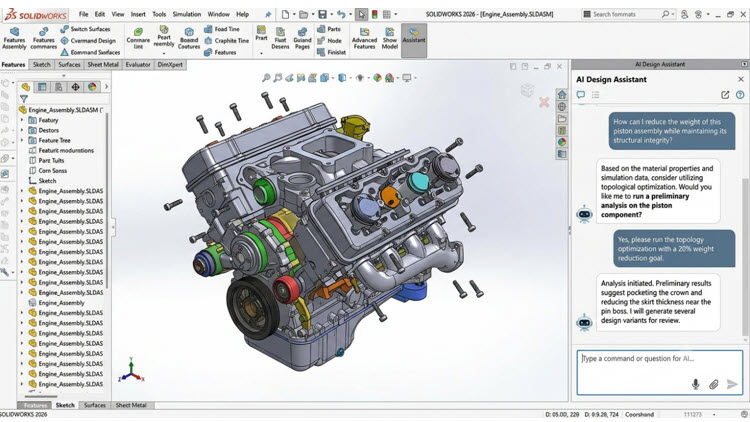
The integrated AI Virtual Companion acts as an engineering knowledge assistant.
Users can ask questions such as:
“Summarize project discussions.”
“Find similar bracket designs.”
“Explain this design issue.”
The AI summarizes community posts, documentation, project knowledge, and engineering discussions to help teams quickly locate information without searching through multiple files.
FEATURE 3
Intelligent Assembly Creation
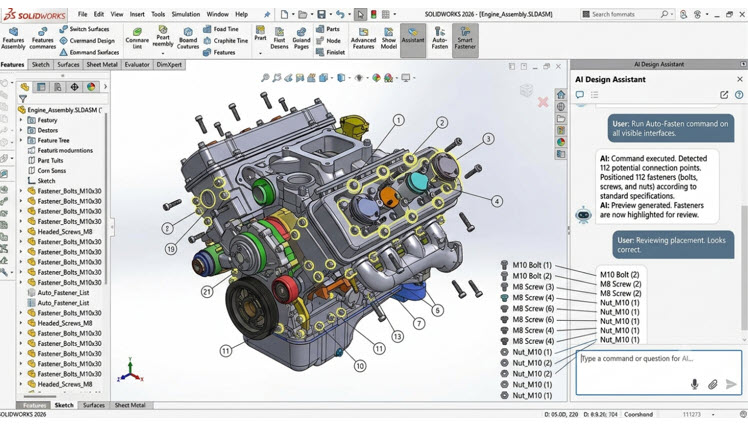
AI now recognizes standard hardware such as bolts, washers, and nuts and automatically assists with assembly creation.
Benefits include:
• Faster assembly modeling
• Reduced repetitive mate operations
• Improved assembly accuracy
• Less manual effort
The result is significantly shorter assembly preparation time for complex products.
FEATURE 4
Embedded AI Design Assistant
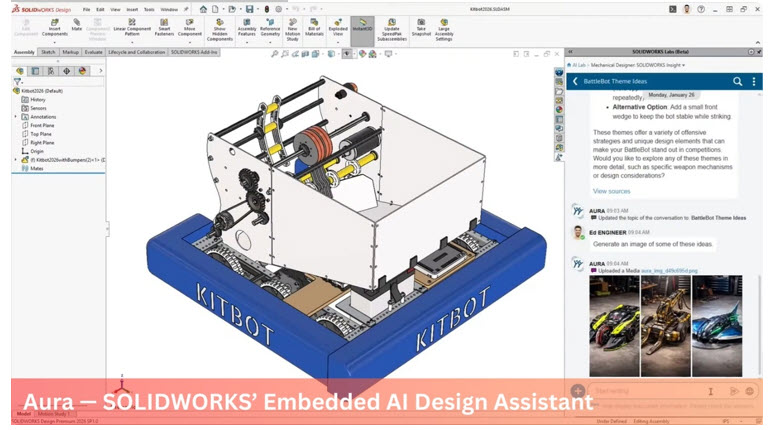
AI continuously learns from engineering workflows and offers intelligent suggestions during:
• Part Modeling
• Sheet Metal Design
• Weldments
• Structure Design
• Parametric Modeling
Instead of interrupting the designer, recommendations appear naturally throughout the modeling process, helping engineers complete tasks more efficiently.
FEATURE 5
AI-Powered Collaboration on the SOLIDWORKS Design Platform
Because SOLIDWORKS is connected to the SOLIDWORKS Design platform, AI improves collaboration by:
✔ Summarizing project discussions
✔ Organizing engineering knowledge
✔ Finding relevant documents
✔ Identifying design dependencies
✔ Supporting better engineering decisions
Engineering, manufacturing, procurement, and management teams remain connected through a common cloud-based environment.
FEATURE 6
Faster Engineering Decisions with AI

AI analyzes engineering information and helps identify:
• Design inconsistencies
• Missing information
• Repetitive workflows
• Potential productivity improvements
Instead of spending hours searching through project data, engineers receive relevant information instantly.
LOOKING AHEAD
Artificial Intelligence in SOLIDWORKS 2026 is designed to augment engineering expertise rather than replace it. From AI-assisted drawing creation and intelligent assembly generation to virtual companions that summarize engineering knowledge, the platform enables teams to work more efficiently while maintaining full design control. As AI capabilities continue to evolve across the SOLIDWORKS Design platform, organizations can expect faster product development, improved collaboration, and more informed engineering decisions.
Guest Post by: Mr. Aakash Sonawane, Pre-Sales Application Engineer, BEACON
For more info on SOLIDWORKS AI, contact the BEACON Team for a live demo